> ## Documentation Index
> Fetch the complete documentation index at: https://semgrep-ee9d73d8-api-changelog-from-openapi.mintlify.site/llms.txt
> Use this file to discover all available pages before exploring further.
# Upgrade guidance and Autofix
**Upgrade guidance** uses program analysis and AI to analyze the results of your Semgrep Supply Chain scans to see if you can safely and reliably update a vulnerable package or dependency to a fixed version. From there, you can choose to:
* Use **Autofix** and have Semgrep open a pull request (PR) or merge request (MR) that updates the dependency to a fixed version. If the update is a breaking change, Semgrep provides guidance on how to handle it in the PR or MR description.
* Create a Jira ticket to track further work on the finding.
* Set the finding's triage status as **To fix**
## Prerequisites
Upgrade guidance and Autofix are supported for:
* **JavaScript** projects
* **Python** projects that use the following package managers:
* `pip`
* `pip-tools`
* `pipenv`
* `poetry`
* `uv`
You must use one of the following source code managers:
* GitHub Cloud
* GitLab Cloud
Upgrade guidance and Autofix support:
* Public `npm` and PyPI registries
* Private PyPI registries
### Feature availability
To access **all** Upgrade guidance and Autofix features, you must have:
* Enabled Upgrade guidance in Semgrep AppSec Platform by going to [**Settings > General > Supply Chain**](https://semgrep.dev/orgs/-/settings/general/supplyChain), then clicking the **Upgrade guidance & Autofix** toggle.
* At least one repository with [full Semgrep Supply Chain scans](/semgrep-supply-chain/set-up-and-configure).
* Semgrep Multimodal [enabled](/semgrep-multimodal/getting-started).
* Granted Semgrep **Read and write** access to your repository. See [Grant read and write access](/semgrep-appsec-platform/scm-code-access).
* **GitHub users** must install the private GitHub app for Semgrep. To create Autofix pull requests, the app must have [Contents: Read and write](/semgrep-appsec-platform/scm-code-access#grant-code-access-to-semgrep-with-a-private-github-app) permissions. Existing customers who haven't already granted this permission must update their app configuration.
* Autofix PRs for Supply Chain use the same private GitHub App **Contents: Read and write** permission as [Autofix for Semgrep Code](/semgrep-code/triage-remediation/autofix). See [Grant code access to Semgrep with a private GitHub app](/semgrep-appsec-platform/scm-code-access#grant-code-access-to-semgrep-with-a-private-github-app) for setup steps. For GitHub Autofix API details, see [Autofix permissions](/deployment/prepare/scm-permissions#autofix-github-permissions).
* Optionally: if you have [a private registry, connect it to Semgrep](/kb/semgrep-supply-chain/connect-a-private-registry) to improve results.
The following table summarizes the features available to you depending on the prerequisites you meet:
| Semgrep features available | [Contents: Read and write](/semgrep-appsec-platform/scm-code-access#grant-code-access-to-semgrep-with-a-private-github-app) permission granted | [Code access granted to Semgrep through installation of the private GitHub app](/deployment/managed-scanning/github#permissions) | [Semgrep Multimodal enabled](/semgrep-multimodal/getting-started) | [Private registry connected to Semgrep](/kb/semgrep-supply-chain/connect-a-private-registry) |
| :----------------------------------------------------------------------------------------------------------------------------------------------------------------------------------------------------------------------------------------------------------------------------------------------------------------------------------------------------------------------------------------------------------------------------------------------------------------------------------------------------------------------------------------------------------------------------------------------------------------------------------------------------------------------------------------------------------------------------------------------------------------------------------------------------------- | :--------------------------------------------------------------------------------------------------------------------------------------------- | :------------------------------------------------------------------------------------------------------------------------------- | :---------------------------------------------------------------- | :----------------------------------------------------------------------------------------------------- |
| All Autofix and Upgrade guidance features, including:- Upgrade filter for Findings
- Upgrade guidance on the Finding Details page
- Coupled or blocked upgrade information shown on the Finding Details page
- Ability to open a PR to upgrade
| | | | |
| All Autofix and Upgrade guidance features, but not for dependencies in a private registry:- Upgrade filter for Findings
- Upgrade guidance on the Finding Details page
- Coupled or blocked upgrade information shown on the Finding Details page
- Ability to open a PR to upgrade
| | | | The private registry is not connected to Semgrep |
| Autofix, but not for dependencies in a private registry: - Ability to open a PR to upgrade
| | | | The private registry is not connected to Semgrep |
| All Upgrade guidance features, including:- Upgrade filter for Findings
- Upgrade guidance on the Finding Details page
- Coupled or blocked upgrade information shown on the Finding Details page
| | | | |
| All Upgrade guidance features, but not for dependencies in a private registry:- Upgrade filter for Findings
- Upgrade guidance on the Finding Details page
- Coupled or blocked upgrade information shown on the Finding Details page
| | | | The private registry is not connected to Semgrep |
## How Upgrade guidance works
After you turn on Upgrade guidance, Semgrep performs post-scan analysis on your existing results and marks applicable findings as either **Safe to upgrade** or with **Breaking changes**.
* This analysis is performed after every **full scan**.
* Only findings with dependencies that have **fixed versions** that resolve the vulnerability are marked by Semgrep as **Safe to upgrade** or with **Breaking changes**.
* Findings without any fixed versions say **no patch available**. They do not have a badge.
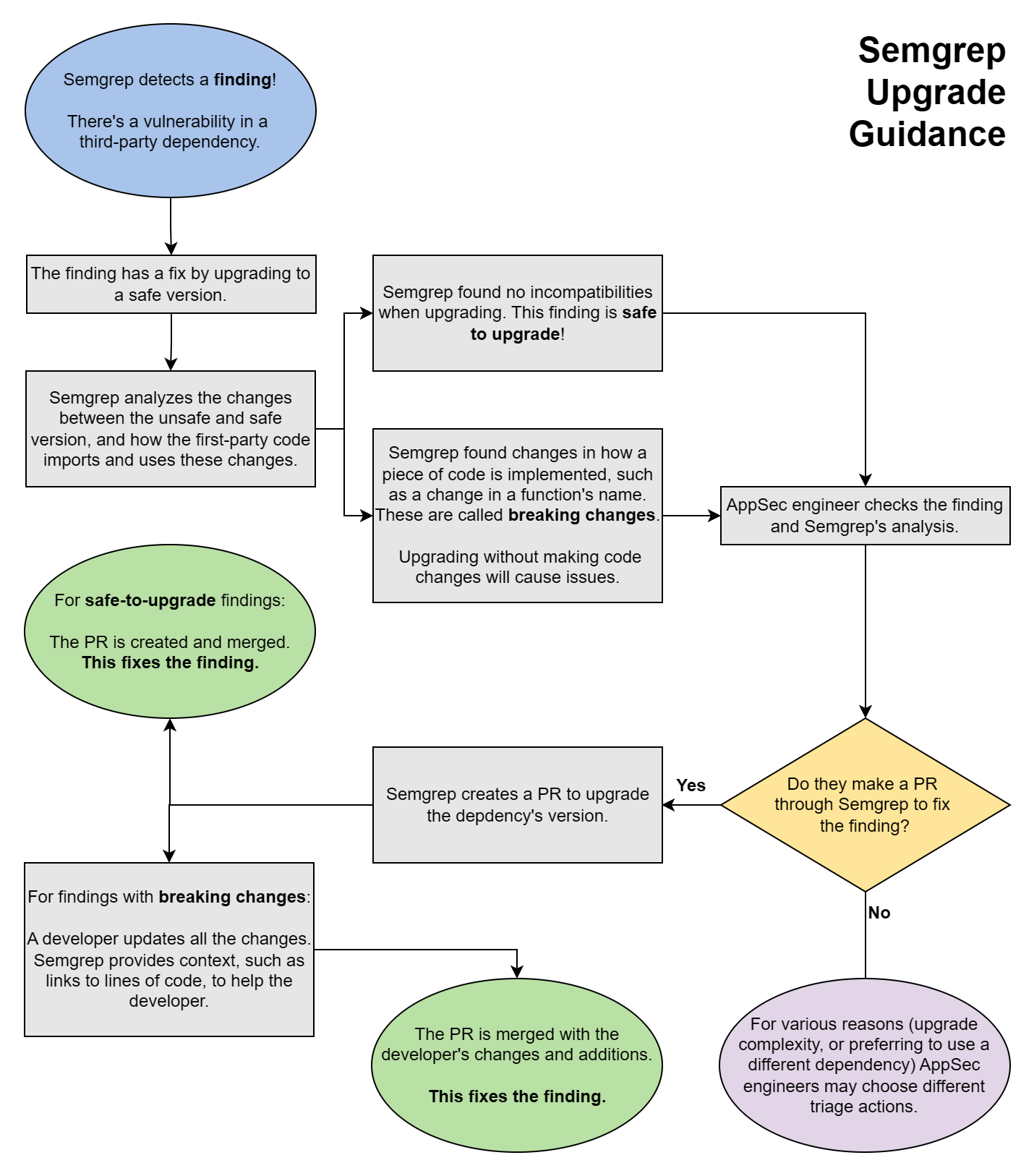
The following chart illustrates the steps Semgrep performs, from scanning to analysis, and the actions you can take based on the advice it provides.
 ## Why Upgrade guidance may not appear when your project uses private packages
To generate Upgrade guidance, Semgrep does not simply look up the vulnerable package. It runs your package manager's own dependency resolver to verify that the upgrade works in your project and to detect any other dependencies that must move with it.
Dependency resolution is all-or-nothing: the resolver must fetch metadata for every package in the manifest, not just the vulnerable one. If even one package lives in a private registry that Semgrep cannot authenticate to, resolution cannot complete, and there is no way to produce a trustworthy result while skipping that package. When this happens, Semgrep does not display partial or unverified guidance for findings in that manifest. No guidance is shown rather than guidance that could not be fully verified.
* **The impact is per manifest, not per finding.** A single unresolvable private package can suppress Upgrade guidance for all findings in that manifest or lockfile, including findings on public packages.
* **Connecting your private registry helps.** [Connect your private registry to Semgrep](/kb/semgrep-supply-chain/connect-a-private-registry) so that the resolver can authenticate to it. For example, private PyPI registries are supported once connected.
## Review a finding's Upgrade guidance
To view detailed information about a finding in Semgrep AppSec Platform, use the **navigation bar** to go to the **Supply Chain** page. Click the finding to open its **Details** page.
The **Details** page is divided into several panels:
* General information:
* The name of the package and a description of the finding
* Its reachability, whether it is direct or transitive, its CVE number, EPSS, and severity
* Its remediation version, if any
* Links to references
* A badge indicating if it can cause breaking changes or not (beta)
* Branch and finding history information
* Branches where the finding appears
* Where it was first detected
* AI analysis, if available
* Graphs and code:
* **Your code**: the source file in which a match was detected; the highlight indicates where the match was found
* **Dependency path**: displays the path of dependencies; useful when analyzing transitive dependencies
* **Pattern** and **Rule**: the pattern and rule logic that determined the match
## Open a PR or MR with fixes
After reviewing a finding's Upgrade guidance, you can open a pull request or merge request to upgrade the dependency to a safe version:
Go to the finding's **Details** page.
Click **Fix** > **Open Autofix PR**.
The newly created PR or MR includes the following:
* The lockfile or manifest file changes needed to upgrade the dependency.
* The context necessary for developers to fix potentially breaking changes in the PR or MR's description. This includes:
* A summary including the severity and reachability of the finding and the specific version of the dependency that the PR upgrades to.
* Vulnerability details, including a description of the vulnerability and links to its CVE references.
* Upgrade guidance that includes the files and functions in the code that make use of the dependency and might include breaking changes.
* Dependency references, such as release notes, changelogs, and commits of the dependency, which might be helpful to resolve the breaking changes.
## Why Upgrade guidance may not appear when your project uses private packages
To generate Upgrade guidance, Semgrep does not simply look up the vulnerable package. It runs your package manager's own dependency resolver to verify that the upgrade works in your project and to detect any other dependencies that must move with it.
Dependency resolution is all-or-nothing: the resolver must fetch metadata for every package in the manifest, not just the vulnerable one. If even one package lives in a private registry that Semgrep cannot authenticate to, resolution cannot complete, and there is no way to produce a trustworthy result while skipping that package. When this happens, Semgrep does not display partial or unverified guidance for findings in that manifest. No guidance is shown rather than guidance that could not be fully verified.
* **The impact is per manifest, not per finding.** A single unresolvable private package can suppress Upgrade guidance for all findings in that manifest or lockfile, including findings on public packages.
* **Connecting your private registry helps.** [Connect your private registry to Semgrep](/kb/semgrep-supply-chain/connect-a-private-registry) so that the resolver can authenticate to it. For example, private PyPI registries are supported once connected.
## Review a finding's Upgrade guidance
To view detailed information about a finding in Semgrep AppSec Platform, use the **navigation bar** to go to the **Supply Chain** page. Click the finding to open its **Details** page.
The **Details** page is divided into several panels:
* General information:
* The name of the package and a description of the finding
* Its reachability, whether it is direct or transitive, its CVE number, EPSS, and severity
* Its remediation version, if any
* Links to references
* A badge indicating if it can cause breaking changes or not (beta)
* Branch and finding history information
* Branches where the finding appears
* Where it was first detected
* AI analysis, if available
* Graphs and code:
* **Your code**: the source file in which a match was detected; the highlight indicates where the match was found
* **Dependency path**: displays the path of dependencies; useful when analyzing transitive dependencies
* **Pattern** and **Rule**: the pattern and rule logic that determined the match
## Open a PR or MR with fixes
After reviewing a finding's Upgrade guidance, you can open a pull request or merge request to upgrade the dependency to a safe version:
Go to the finding's **Details** page.
Click **Fix** > **Open Autofix PR**.
The newly created PR or MR includes the following:
* The lockfile or manifest file changes needed to upgrade the dependency.
* The context necessary for developers to fix potentially breaking changes in the PR or MR's description. This includes:
* A summary including the severity and reachability of the finding and the specific version of the dependency that the PR upgrades to.
* Vulnerability details, including a description of the vulnerability and links to its CVE references.
* Upgrade guidance that includes the files and functions in the code that make use of the dependency and might include breaking changes.
* Dependency references, such as release notes, changelogs, and commits of the dependency, which might be helpful to resolve the breaking changes.